API: Getting Started
Matrify’s RESTful API lets you read, write, delete and query every piece of data in your database.
AI agents work through this API too, with their permissions controlled in the same way as for any other user.
Example in Python
This script gets you started with the most common API calls for creating, updating, deleting, getting and querying records.
Watch live example requests
The Matrify web interface uses exactly the same API to talk to the server, so everything you can do in the web interface, you can also do through the API.
To find an example for any request, perform the action in the web interface and watch the request in your browser’s Developer Console:
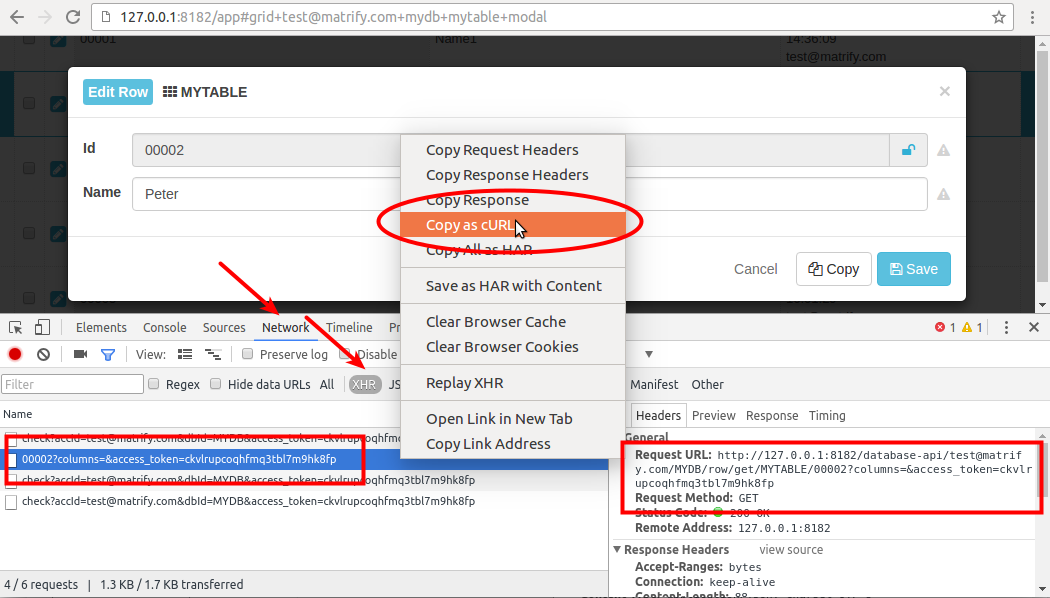
This screenshot shows the Chrome Developer Console with the Network and XHR tabs selected, which display the requests between web interface and server. In this example, opening the dialog to edit a record sends a GET Row request.
To test a GET request, copy the Request URL and paste it into a new browser tab. For POST requests, choose Copy as cURL and run the request with your cURL command-line tool.
Back up and restore a database
These example scripts show how to back up and restore a single database through the REST API: